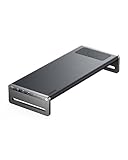
Modern MacBooks, while powerful and portable, have limited port options that can make them less than ideal for desktop setups. MacBook Air models primarily offer USB-C ports, while MacBook Pro models add an HDMI port and SD card reader but still fall short of typical desktop connectivity needs. A docking station can transform your MacBook into a fully-featured desktop workstation without relying on multiple adapters or dongles.
Top Recommended Docking Stations:
-
Anker 675 USB-C Docking Station
- 12-in-1 connection hub with aluminum alloy construction
- Features:
- 100W USB-C laptop connection
- Five 10Gbps USB ports (2 Type-C, 3 Type-A)
- SD and microSD card slots
- 3.5mm audio jack
- Gigabit Ethernet
- HDMI port (4K/60Hz)
- Built-in monitor stand design
- Qi wireless charging (10W Samsung, 7.5W iPhone)
- Cable management system
-
Ugreen Revodok Max 13-in-1 Thunderbolt 4
- Comprehensive connectivity solution
- Key features:
- 40Gbps Thunderbolt 4 connection
- Multiple display outputs (8K@30Hz capable)
- Gigabit Ethernet
- Multiple USB ports with varying speeds
- Card reader slots
- 60W host charging
- Compatible with multiple monitor setups on M1/M2/M3 chips
-
Baseus Joystar 7-in-1 USB-C Hub
- Budget-friendly option
- Features:
- Three USB 3.0 Type-A ports (5Gbps)
- USB-C port with 100W power delivery
- SD card slot
- HDMI port (4K@60Hz)
- Compact design (4.5″ x 1.7″ x 0.63″)
-
J5Create M.2 NVMe USB-C Gen 2 Docking Station
- Unique storage expansion capability
- Features:
- M.2 NVMe/SATA SSD slot
- 4K DisplayPort and HDMI outputs
- Gigabit Ethernet
- Card reader slots
- Multiple USB ports
- 100W power delivery
- Security cable lock slot
-
Kensington SD5900T EQ Thunderbolt 4
- Advanced display support
- Features:
- Quad 4K/60Hz display support
- 16-in-1 connectivity
- Multiple USB ports with various speeds
- 2.5Gbps Ethernet
- Card reader slots
- 96W charging
- Recycled aluminum construction
-
OWC Thunderbolt Pro Dock
- Professional-grade solution
- Features:
- 10Gbps Ethernet
- CFexpress and SD card readers
- Multiple Thunderbolt ports
- High-speed USB ports
- 85W charging
- Support for up to 8K displays
-
Satechi Thunderbolt 4 Docking Station
- Enhanced display compatibility
- Features:
- Multiple external display support
- DisplayLink technology
- Various high-speed ports
- Compact design
- Compatible with latest M-series chips
-
Plugable Thunderbolt 4 & USB4 HDMI Docking Station
- Versatile connectivity
- Features:
- 40Gbps Thunderbolt 4 ports
- Multiple USB ports
- 2.5Gbps Ethernet
- Fast charging capabilities
- Dual 4K display support
-
VisionTek VT7400 Triple Display 4K
- Maximum display connectivity
- Features:
- Triple 4K display support
- Multiple USB ports
- 100W power delivery
- DisplayLink technology
- Enterprise features (Wake-on-LAN, PXE Boot)
Key Considerations When Choosing a Docking Station:
- Port Selection
- Consider the number and types of ports needed
- Ensure compatibility with existing peripherals
- Consider future expansion needs
- Display Support
- Check maximum resolution and refresh rate support
- Verify compatibility with M-series chip limitations
- Consider multi-monitor requirements
- Power Delivery
- Ensure sufficient wattage for your MacBook model
- Consider power needs of connected peripherals
- Check pass-through charging capabilities
- Build Quality and Design
- Consider desk space and setup requirements
- Evaluate material quality and durability
- Check for additional features like cable management
- Price Point
- Budget options start around $20
- Mid-range solutions $100-250
- Professional-grade options $300+
- Special Features
- Wireless charging capabilities
- Built-in stand functionality
- Security features
- Enterprise management capabilities
Each docking station offers different combinations of features and capabilities, making it important to assess your specific needs before making a selection. Consider factors such as your typical workflow, desk setup, peripheral requirements, and budget when choosing the right docking station for your MacBook.
These docking stations can significantly enhance your MacBook’s functionality in a desktop environment, providing the additional connectivity needed for a full workstation setup while maintaining the flexibility to quickly disconnect for portable use.